

Music Assistant 2.9: Discover Your Sound

The crew’s been hard at work, and we’re pretty excited to show what we’ve been up to… Music Assistant is back and making waves with version 2.9! 🎉
With your audio ecosystem shipshape from previous releases, this time around we’re diving into the music itself. We’ve dedicated the last few months to clearing bugs, adding highly requested providers, and crafting new ways for you to explore your library – all with the help of our incredible community.
Version 2.9 translates complex sonic code to bring you a simpler, more personal listening experience that’s more intuitive than ever. We can’t wait for you to get on board!
”I Can See Clearly Now”
Section titled “”I Can See Clearly Now””Your personal Discover page
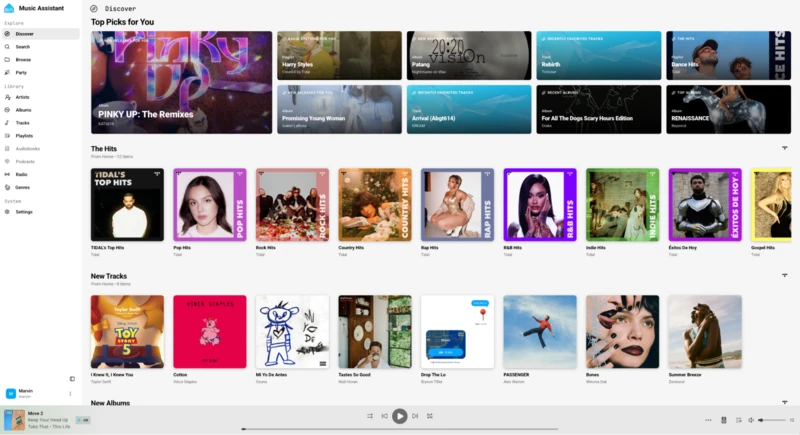
A page built just for you
Not sure what to play next? Our refreshed Discover page is your first port of call! 🔎 Instead of dredging through an endless library, top picks are curated to your taste and waiting when you arrive – like a friendly record store clerk who always knows just the right album for the moment. Finding your next favorite track is just a couple of clicks away.
And this is just the first step in redesigning the Discover page – we’ll be working with our UX and frontend experts, along with the community, to gradually revamp the UI and UX in upcoming releases. More on the horizon 👀. But the discovery doesn’t stop there…
”Good Vibrations”
Section titled “”Good Vibrations””Deep dive with Audio Analysis
Music Assistant is getting a major refit with a brand-new type of provider: Audio Analysis! This new feature analyzes your audio files to understand what makes them unique – so you can listen to music that moves you, and switch between tracks without missing a beat.
And thanks to our contributors, we’re launching it with some pretty cool capabilities:
- Smart Fades: By running beat detection on your tracks, Music Assistant can now time your smart crossfades with precision, making song transitions seamless.
- Sonic Analysis & Sonic Similarity Plugin: Thanks to @chrisuthe, we can now analyze your local audio files for acoustic similarity. This brings features like “Radio Mode” and “Don’t Stop the Music” to your local library for the first time – no streaming service required! And to top it off, you can now search your local music library using natural language - meaning you can find music by describing how it sounds, not just what it’s called 🤯.
- AcoustID: Have a collection of old digitized CDs with missing metadata? AcoustID detects the acoustic fingerprint of your audio, matches it to a MusicBrainz ID, and automatically pulls in the right tags, thanks to @OzGav 🙌
While Audio Analysis makes sure your listening session is smooth sailing, Sendspin is taking care of the view along the way…
”Light My Fire”
Section titled “”Light My Fire””Sendspin gets visual
Since launching in 2.7, Sendspin has become instrumental to how Music Assistant keeps your home in sync – and we’re not the only ones making a song and dance about it! The open source streaming protocol now ships in ESPHome, LedFx, and across a growing community of third-party clients on Android, desktop, ESP32 and beyond – meaning more choice to set up your system exactly as you like. And with audio sync rock solid, we’re building even more ways for you to enjoy your music. In 2.9, that means Sendspin gets visual.
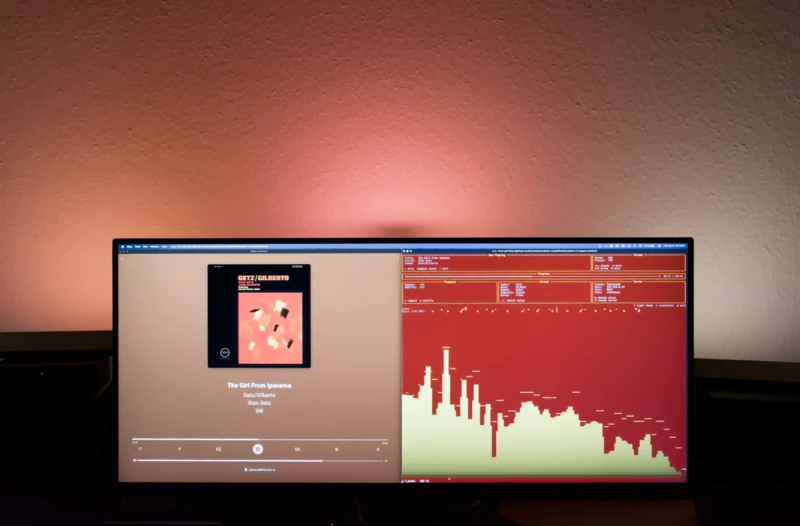
Music that lights up the room 🔥
From displaying a track’s art and info, to matching your lights to your music – Sendspin now supports visualizers! Music Assistant 2.9 introduces a Philips Hue to Sendspin bridge, allowing you to sync your smart lights to the rhythm of a track thanks to our new Smart Fades beat analysis. Your living room is officially a dance floor 🪩.
”Life in the Fast Lane”
Section titled “”Life in the Fast Lane””Quick access to your favorites
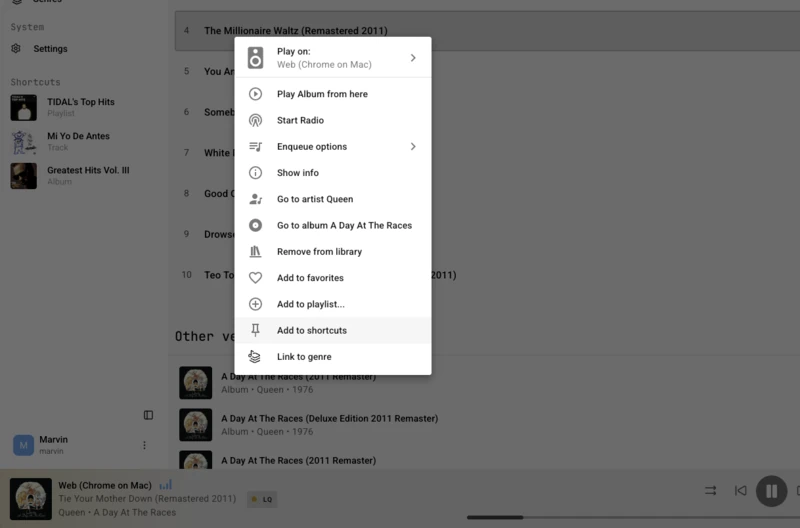
Straight to the good stuff
Remember that unused space on the navigation menu? Well, it’s no longer an empty bar 👀 @DMoo made sure it was filled with something worth playing: your shortcuts! You can now pin any piece of media for one-click access to your favorites.
Be it a go-to track, an album on rotation, or a playlist that puts you in the right mood – they now have a dedicated home, ready to soundtrack yours. And for those ready to venture further – into your library or beyond it – there’s a new plugin to help you get there…
”A Kind of Magic”
Section titled “”A Kind of Magic””Introducing Smart Playlists
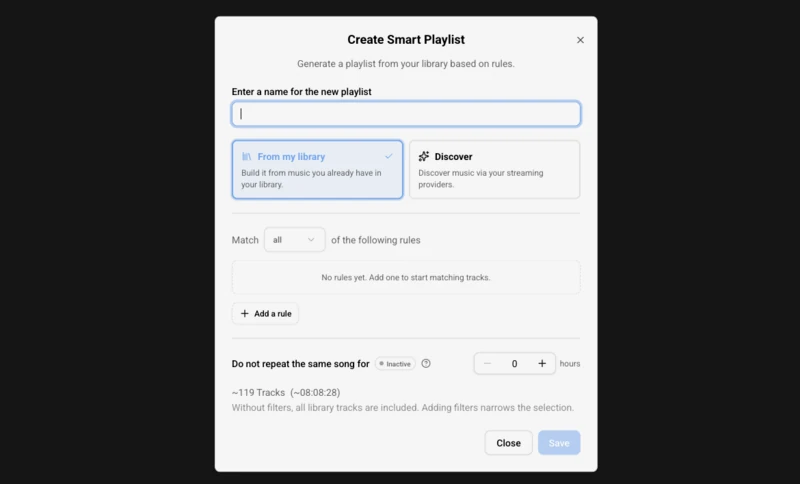
Set the rules, and the playlist does the rest 🎶
Creating the perfect mix used to be a chore, but with the new Smart Playlist plugin, you’ll be cruising! Fully automated, this impressive addition by @DMoo helps you get the most out of your music. The plugin works in two distinct ways:
- Explore your library: Set up custom rules and filters to scan your library and build a self-updating queue. Want a playlist of highly-rated indie rock tracks from the 90s that you haven’t listened to in the last month? Set the rules once, and Music Assistant will refresh your playlist as your library changes.
- Discover more: Feed the plugin “seed” media items – a favorite track, a specific artist, or a niche genre. The plugin then uses those seeds to venture outside your library, compiling new music to match your vibe.
Whether you want to curate your classics or try something new, the new Smart Playlist plugin has your soundtrack sorted ✅
“Just Can’t Get Enough”
Section titled ““Just Can’t Get Enough””…of everything 2.9 has to offer
Since we’ve squeezed too much into version 2.9 to possibly cover in one blog — here’s a sampler of all the key updates:
New music sources
- Add your remote WebDAV music library
- Tap into QQ Music – mainland China’s largest freemium streaming service
- Tune into Mother Earth Radio: human-curated, ad-free, audiophile-quality internet radio
- Browse MusicMe – a French streaming service with 13M+ tracks
- Discover NetEase Cloud Music’s playlists, lyrics, and personalized recommendations
- Stream NTS Radio’s live channels and Infinite Mixtapes – independent, eclectic radio from over 50 cities worldwide
New player support
- WiiM and MSX Bridge players are now supported
- Want audio straight through your machine? Local Audio Out routes playback directly through local hardware
- MPD fans can connect their servers, and Samsung WAM speakers are now supported too
More to explore
- Set volume limits per player – define a minimum and maximum so nothing gets accidentally too quiet or too loud
- Control playback speed for podcasts and audiobooks, slowing down or speeding things up as needed
- Connect Music Assistant to your favorite LLM with the new MCP Server Provider
- See artist artwork on radio streams
And there’s plenty more where that came from! Check out the release notes to see everything that’s new 👀
“Hooked on a Feeling”
Section titled ““Hooked on a Feeling””The adventure continues…
Our latest release is packed to the brim with updates that put you at the helm of your home listening experience. You choose your players, your music – and your adventure. For anyone new, head to our how to get started page for guidance.
Releases run on a three month cadence, and we want your voice in the mix for the next one! Want to see new features faster and share early feedback? Join our beta channel and help shape what comes next as we’re building it. You can also share your ideas on our feature requests page, or drop by Discord just to say hello – we’d love to chat!