

Sonic Similarity
Section titled “Sonic Similarity”The Sonic Similarity plugin turns the audio fingerprints already produced by the Sonic Analysis provider into useful discovery surfaces across your library — all running locally on the server.
What it powers:
- Library-wide Similar Tracks — works even on filesystem libraries and on providers that do not supply their own similar-tracks feed
- Radio mode — the same data is used when Music Assistant needs to extend a queue with similar tracks and no streaming-side radio is available
- An “Inspired by recently played” row on the discover page
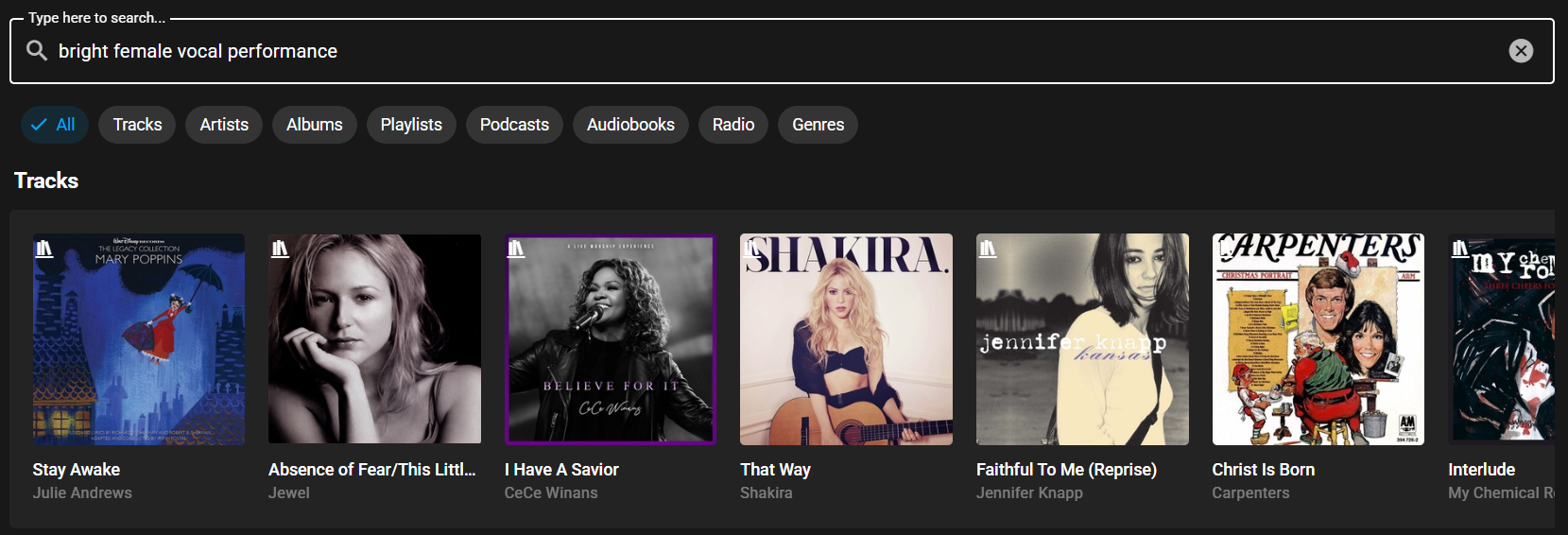
- Natural-language search — optionally lets you search for tracks by typing things like “super dancy disco” or “calm acoustic morning”
No audio is sent anywhere; all similarity and search runs against local indexes stored under the Music Assistant data directory.
Requirements
Section titled “Requirements”The plugin builds on top of the Sonic Analysis provider and the Smart Fades provider, both of which must be configured and have analysed at least a few tracks. Similar Tracks results and the discover row appear once Sonic Similarity has built its index from the available analyses.
What you’ll see in Music Assistant
Section titled “What you’ll see in Music Assistant”Once the plugin has built its index, a Similar tracks section appears on every track’s details page:
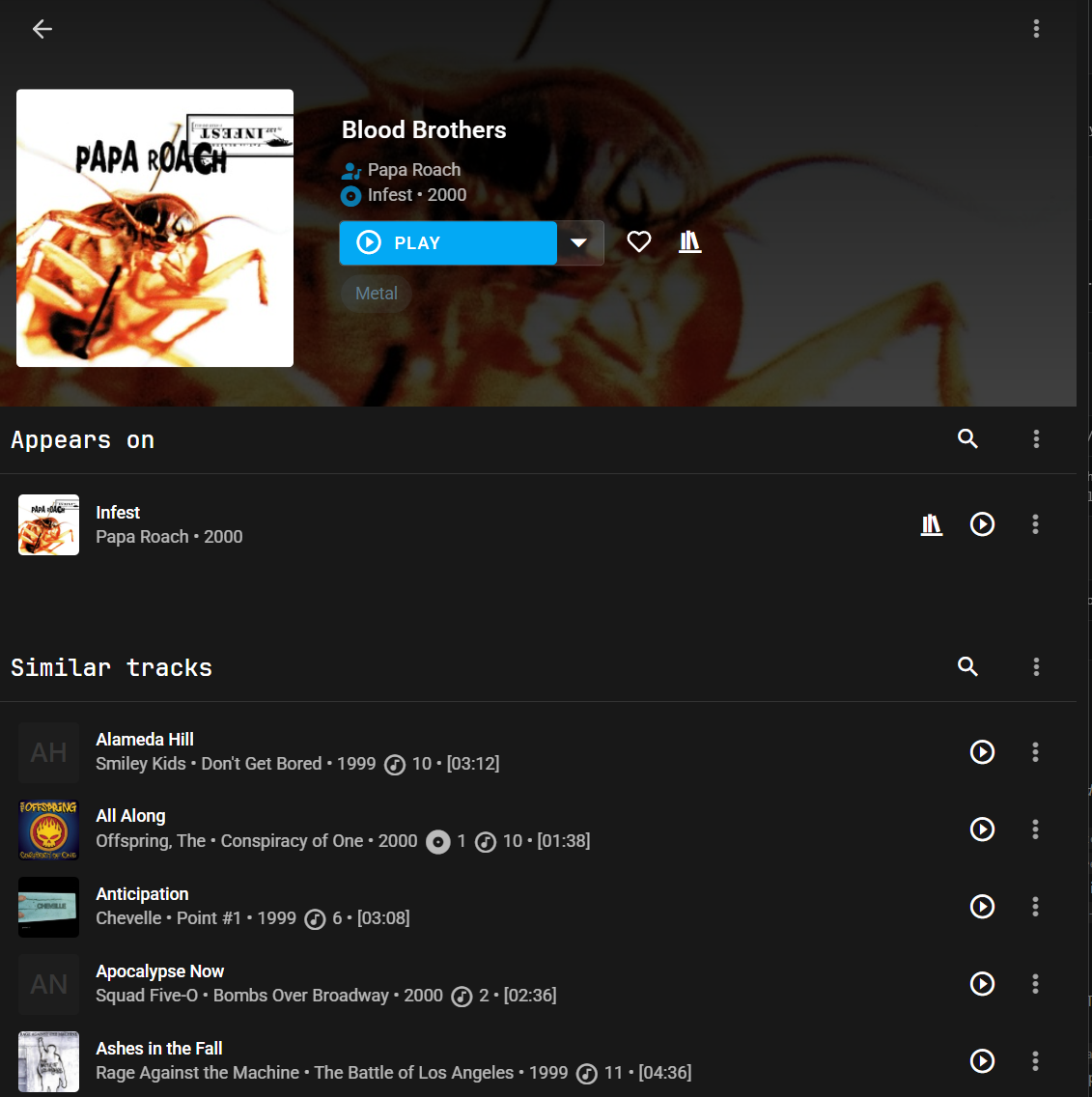
And — unless it is disabled in the settings — an Inspired by recently played row appears on the discover page, seeded by the tracks you have played most recently:

How it works
Section titled “How it works”Three engines run inside the plugin. The Traits engine is always on; the Character and Free-Text Search engines are independently toggleable from the configuration page.
Traits engine (always on)
Section titled “Traits engine (always on)”Matches on measured sound traits — tempo, energy, loudness, key, and so on. The engine builds a small per-track signature from those measurements and ranks neighbours using one of the configurable weight presets. Cheap to build, cheap to query, and fits comfortably in memory for libraries of tens of thousands of tracks.
This engine powers the Similar Tracks menu, radio mode, and the discover row by default.
Character engine (opt-in)
Section titled “Character engine (opt-in)”Matches on overall character — how a listener would describe the sound. The engine builds a second search index over the audio fingerprints that Sonic Analysis already stores for every track; the resulting matches lean toward “this feels like that” rather than “these have similar tempo”, which is useful when a song’s mood or texture matters more than its measurable properties.
No extra downloads are required; the fingerprints are already on disk from Sonic Analysis.
Free-text search (opt-in)
Section titled “Free-text search (opt-in)”Turns a natural-language phrase like “super dancy disco track” into the same kind of fingerprint used for tracks, then returns the tracks whose sound is closest. Enabling this implicitly turns on the Character engine above, since both features share the same model.
The first time free-text search is loaded, about 500 MB of language model files download to the server.
Configuration
Section titled “Configuration”The plugin is installed via Settings → Plugins → Add a Plugin. All settings live on a single configuration page made up of four panels: Generic, Similarity search, Discover, and Status.
Generic
Section titled “Generic”
| Setting | Description |
|---|---|
| Enable Character index | Builds a second on-disk index over the audio fingerprints already produced by Sonic Analysis. Off by default. |
| Enable free-text search | Enables natural-language track search. On first use about 500 MB of language model files are lazily downloaded to the server. |
Toggling either of these requires the plugin to reload before the new feature set takes effect.
Similarity search
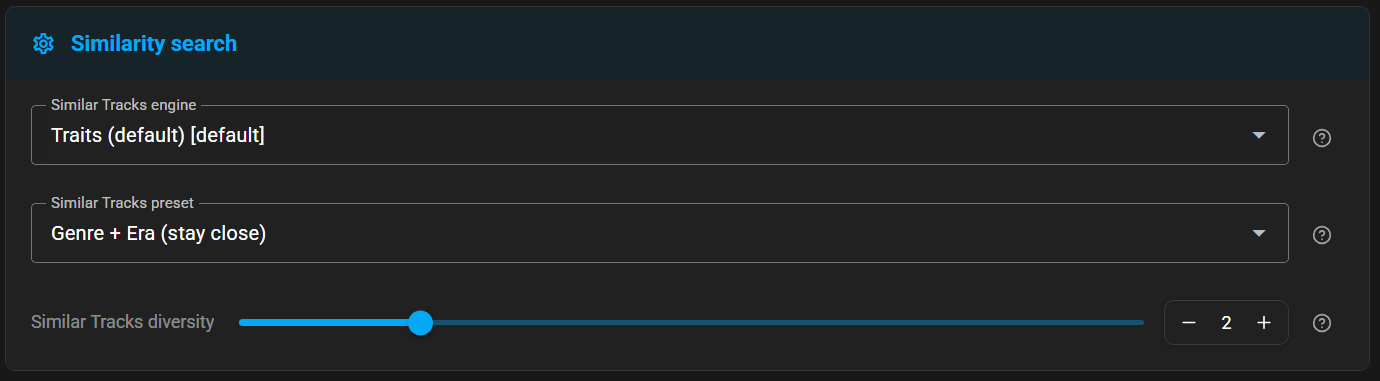
Section titled “Similarity search”Controls how the library-wide Similar Tracks action picks its matches.
| Setting | Description |
|---|---|
| Similar Tracks engine | Which engine powers library-wide Similar Tracks. The Traits option matches on measured sound traits — tempo, energy, loudness, key. The Character option matches on overall character — how a listener would describe the sound — and returns no results for tracks that do not yet have a fingerprint. Only appears when the Character index is enabled. Defaults to Traits. |
| Similar Tracks preset | Weight preset applied when the Traits engine is in use. See Similarity presets below for what each preset favours. Only appears when the Traits engine is selected. Defaults to Balanced. |
| Similar Tracks diversity | Slider from 0 to 10. 0 keeps results closest to the seed; 10 maximises variety. Only appears when the Traits engine is selected. |
Discover
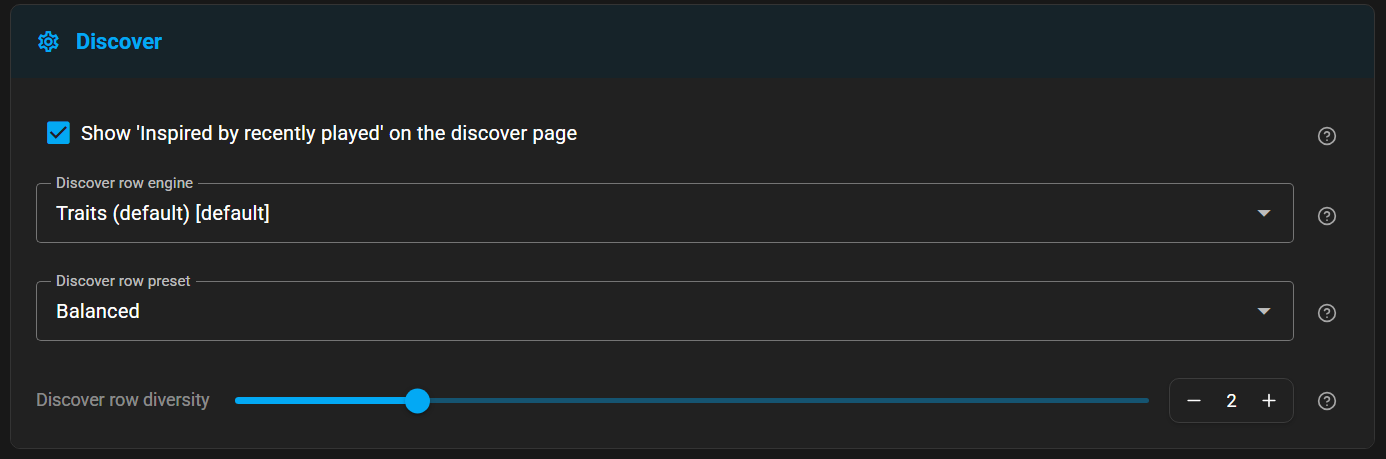
Section titled “Discover”Controls the Inspired by recently played row on the discover page.
| Setting | Description |
|---|---|
| Show ‘Inspired by recently played’ on the discover page | Adds a discover-page row seeded by your recently-played tracks. On by default. Disable this to suppress the row without uninstalling the plugin. |
| Discover row engine | Which engine powers the discover row — same options as the Similar Tracks engine in the Similarity search panel. Only appears when the Character index is enabled. Defaults to Traits. |
| Discover row preset | Similarity weight preset used to rank candidates for the row. See Similarity presets below for what each preset favours. Only appears when the Traits engine is selected. |
| Discover row diversity | Slider from 0 to 10. 0 keeps results closest to the seeds; 10 maximises variety — some results may be less similar individually, but the row as a whole will be more varied. Only appears when the Traits engine is selected. |
Status
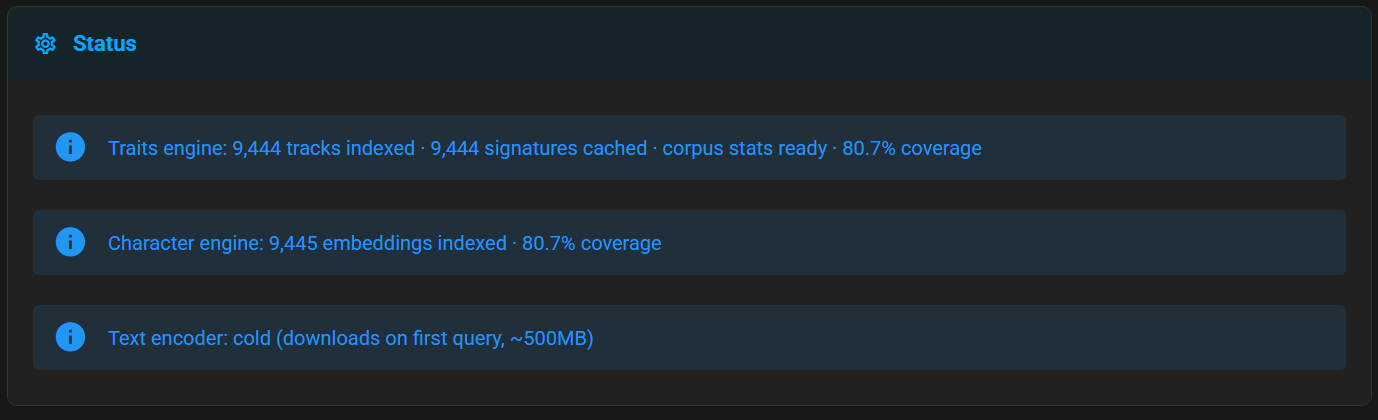
Section titled “Status”Shows the current health of each engine — number of tracks indexed, coverage, and whether the optional text encoder is loaded. Manual rebuild buttons live behind the Advanced toggle on the same page and are not needed in normal use; both engines build and refresh their indexes automatically in the background.
| Element | Meaning |
|---|---|
| Traits engine status row | Shows how many tracks are indexed, how many signatures are cached, whether the engine is ready to serve queries (shown in the UI as corpus stats ready), and, when available, how its coverage compares to Sonic Analysis’ analysed / pending counts. |
| Rebuild Traits index (Advanced) | Re-scans all stored signatures and rebuilds the Traits search index from scratch. Runs in the background. Only present when Advanced settings are shown. |
| Character engine status row | Shows the number of fingerprints indexed and the current coverage. Only present when the Character engine is enabled. |
| Rebuild Character index (Advanced) | Incrementally adds any new fingerprints to the Character index. Runs in the background. Only present when Advanced settings are shown and the Character engine is enabled. |
| Text encoder status row | Shows whether the text encoder is loaded; warm or cold. When cold, the language model files (~500 MB) will be downloaded on the next free-text query. Only present when free-text search is enabled. |
Similarity presets
Section titled “Similarity presets”The Traits engine groups its features and applies a per-group weight when ranking. The five built-in presets bias those weights toward different listening intents:
| Preset | What it favours |
|---|---|
| Balanced | All groups weighted equally. A reasonable default for “more like this”. |
| Vibe | Mood, timbre and dynamics dominate; rhythm and key matter less. |
| Party | Rhythm, regularity and energy dominate; mood and key matter less. |
| Genre + Era | Key and harmonic features, plus genre and era bonuses, dominate. Stays close to the seed’s genre and decade. |
| Discover (novelty-leaning) | Timbre and mood matter most; genre and era are deliberately downweighted so the row is allowed to drift outside the seed’s neighbourhood. |
The Similar Tracks action (configured in the Similarity search panel) and the Inspired by recently played discover row (configured in the Discover panel) each select an engine, preset, and diversity independently, so they can lean different ways — for instance, Similar Tracks can stay close to the seed while the discover row drifts toward novelty.
Known Issues / Notes
Section titled “Known Issues / Notes”- The search indexes live under the Music Assistant data directory as derived caches. They are safe to delete — the next plugin start will recreate them from the existing track analyses.
- Toggling Enable Character index or Enable free-text search, or changing the options for the Discover panel, requires the plugin to reload before the new feature set takes effect.
Credits
Section titled “Credits”- Microsoft CLAP — the joint audio + text model behind the optional Character similarity and free-text search engines.
- unum-cloud/usearch — the fast similarity search library used by both engines.